Text mining on Chloe Ting’s video titles

To do this praxis assignment, I chose to analyze some aspects of Chloe Ting’s Youtube Channel by using Voyant, an open-source text analysis software. 

For those who may not know her work or are not so fond of YouTube at-home workouts, Chole Ting is a very famous YouTuber and fitness influencer that became viral in 2020, as many of us had to stay home during this year due to COVID-19 pandemic. Before the pandemic had spread globally, Ting had 2.6 million subscribers on YouTube, and by the end of July, she was nearing 13 million. While I write this post, her channel shows the mark of 22,3 million subscribers.

There are a couple of reasons why she became such a hit. She has easy-to-follow exercises and short videos, and for most of them, you don’t need any equipment. At the same time, her plans are specific, meaning if you’re looking to train your abs, legs, bum, or shoulders, there is a video or two for you. 

In general, all these aspects are evident at first glance, as her videos titles are very descriptive (ex.: 15 min Intense HIIT for Fat Burn | Standing & No Equipment). Based on this, I started an investigation based on this question:

What are the most frequent types of training people look for in Chloe Ting’s 2021 workout videos? 

My hypothesis was that I could get the answer by identifying the most frequent words in Chloe Ting’s 2021 workout video titles in two phases: first, by doing this exercise with all video titles, in order to understand the general pattern; second, by doing it only with the titles of the most viewed videos (with more than 10M views), in order to consider if there are significant differences between them. For that, I decided to use Voyant, a web-based software that provides different sorts of graphs based on text analysis.

Since I was interested in finding differences between word patterns, I selected the Cirrus visualization, which is a word cloud that visualizes the top frequency words of a corpus or document. Above, you can find the result I got by trying to answer my question:

Most frequent words in Chloe Ting’s 2021 workout video titles
Most frequent words in Chloe Ting’s 2021 most seen workout video titles

Analysis

While some of the most frequent words remained the same (such as workout, challenge, and min), words related to abdomen workout (such as abs, stomach, and flat) were more frequent in the titles of the most seen videos, as well as words related to aerobic workout (such as loss and weight). 

Based on these results, we could infer that Chloe’s audience is more focused on losing weight and getting shredded abs. However, as I decided to also analyze in what ways the most viewed videos were presented in Chloe’s channel, I discovered that other aspects of analysis should be considered.

For example, I noticed that the most seen video in Chloe Ting’s 2021 workout training is a 8 minute quick warm-up routine video, with more than 18M views. Despite its success, as it is the only workout video she produced in 2021 with this specific focus, the expression “warm-up” doesn’t even appear in the cirrus visualization of the titles of the most seen videos.

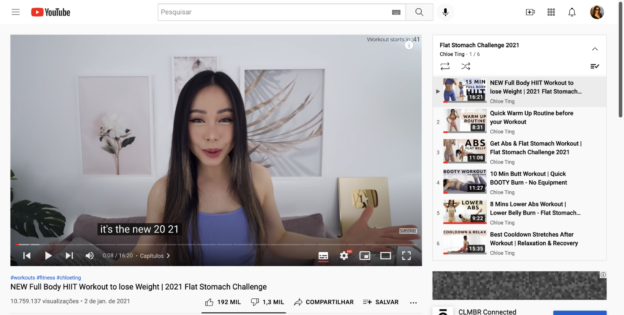
In addition to that, I also realized that as Youtube presents new videos of the same playlist automatically right after a video finishes, the success of specific videos may impact the visibility of others. For example, the videos NEW Full Body HIIT Workout to lose Weight | 2021 Flat Stomach Challenge and DO THIS Workout To Lose Weight | 2 Weeks Shred Challenge 2021 have more than 10M views, and they are both in the same playlist of the 8-minute video I mentioned previously.

Flat Stomach Challenge 2021 playlist

Final thoughts

As I started my exercise to understand issues regarding human behavior on Youtube, analyzing word frequency on video titles provided me with superficial and biased results. First, while exploring the text mining technique, I realized that I should have considered the number of videos that are offered in Chloe’s channel related to each theme. At the end of the experiment, however, I also concluded that answering my question depended on understanding how Youtube’s audience consumes content and how their behavior shapes how Youtube’s algorithm suggests content.

“More Important(ly)” – a Visualization, Felicity Howlett

 “Some decades ago, William Safire wrote about the then current acceptable usage of the words, “more important” and “more importantly.” Thanks to search engines, I located the article in the April 25, 1982 edition of the New York Times Magazine without getting out of my chair (https://www.nytimes.com/1982/04/25/magazine/on-language.html ).

In 1982, I was repelled by Safire’s accommodating attitude to those who would connect the words “more” and “importantly”.  How could the Prince of Grammar adopt such an unaesthetic, auditorily painful position. My response was not unique. Safire was aware that his (somewhat hesitant) acceptance of the usage would inspire an adverse reaction in some readers, and his discussion was both generous and humorous. Since that article, “importantly,” has gained prominence at the beginning of a phrase. As can be seen in the Ngram charts below, the “ly” camp has overrun the less gaudy “More important.” My distaste is more visceral than intellectual, and it has remained with me.

For this visualization assignment, I attempted to look at how the words “important,” “importantly,” “more important,” and “more importantly” appear over time in print.  

I used Google’s Ngram Viewer to seek the single words and bigrams (two-word sequences) as listed above (but without quotation marks). I thought I would get more traction if I specified their function as adverbs (This can be done by pinning “_ADV” to a term).  That, however, did not produce meaningful results. Dropping “important” from the competition–it really functions as an adjective–helped clear up the purpose of the search. The default for the Ngram Viewer is a distinction between upper and lower case letters. I searched first without distinguishing cases and then again with the default. I capitalized all of the first words, hoping that this approach would cause the search engine to focus on the beginnings of sentences. It seemed to improve the quality of the search somewhat, but I could not find a way to limit the search to this approach. The charts below show the word “Start” preceding the bigrams. This application permits the search engine to look for modifying words that are closely related to the main term, for example, to count “Most importantly” as well “More importantly.”

The charts below represent the same search in English language materials spanning different time sequences, from 1969-2019 and from 1999-2019. They illustrate the consistency of the trend and show that when used as an adverb, alone or with a modifier, ‘importantly’ overtook ‘important’ around 2010.

As I was looking at possible approaches to this topic, I found further confirmation of the trend and discussion of usage. For example, dictionary.com, based on the Random House Unabridged Dictionary 2021, includes the following note:

The Merriam-Webster online site devotes an article to the subject: “We Know You’re Concerned about ‘Important” and ‘Importantly.'” Nineteenth century examples are provided for both ‘More important,’ and ‘More importantly.’ https://www.merriam-webster.com/words-at-play/we-know-youre-concerned-about-important-and-importantly To my surprise, the graph depicting usage trends from 1800 was produced by the Google Ngram Viewer.

Before I came upon the Merriam-Webster graph, I thought I would have to trash the Ngram Viewer and start from scratch. The more I worked with it, the more I felt an ambiguity about how the search decisions were made and what I could reasonably conclude from the results. For example, was I double dipping by asking the search engine to find both the single word ‘important’ and its appearance with a modifier? I did not see a way to control for that. Nor did I understand what it might or might not mean for the search to take place in a massive collection of undifferentiated material. Google describes the Ngram Viewer’s corpus as “the scanned books available in Google Books.” Would I have obtained a sharper depiction if I had searched only newspaper articles or research articles? How would such selections affect an interpretation, and for that matter, what can be interpreted from this information? If I could tighten the search either by using a program that offered more choices or by developing enough skill so that I could tweak the Ngram search, what possible differences might be obtained? By now, I’m about saturated with this topic. I going to believe that Merriam-Webster, by example, gave me permission to use the Ngram Viewer as a visualizer. My sense of a historic trend corresponded to the trends found by the Ngram Viewer, and articles from dictionary sources confirm the feelings and the findings! Questions about the corpus, how searches are conducted, and what kinds of conclusions may be drawn from the results will continue to be an ever-present and fascinating part of this work.

Open Access Explained: Best Practices for Finding Others’ Research and Publicly Sharing Yours

Mina Rees Library Workshop Series

Presenter: Jill Cisarella- [email protected]

Review co-written with Nelson Jarrin

This workshop was conducted by Jill Cisarella on October 26, 2021. Jill is a very organized and dynamic speaker who shared with us her excellent PowerPoint presentation:

http://bit.ly/oa-explained-2021

The objective of the workshop, she said, was to show us how to publicly share our work and how to find the work that others share.

Here are some aspects of OA that she elaborated upon:

1. Background:

Not too long ago, most journals were printed and available in a physical form. Now, in the digital age, many journals and scholarly articles are primarily or exclusively online. As for books, publishers used to charge a hefty fee to print and distribute physical books with hundreds of pages. Now, publishers prepare and distribute books and journals online, but this has not brought access prices down. Selfishly, publishers do not share any of their savings and profits from digital publishing with the consumers, writers or reviewers. To the contrary, certain publishers have created a new form of lucrative business in which they place journals, books and articles behind paywalls.

Our presenter shared with us some stark numbers: the profits of publishing companies such as Elsevier and Spring have surpassed those of Apple, Google and BMW!

2. What is Open Access?

Jill landed at the definition of OA by way of contrasting the traditional system of scholarly publication (“outmoded, expensive, and exploitative”) and the OA publication system (“community-owned, scholar-led, values-driven”).

There is a debate between whether Open Access is defined by cost-free, public-access publishing that is legal and available online or by public access plus open license, that is, the right for anyone “to reproduce, make derivative works, distribute, display, perform, etc.”

For this workshop, our presenter used the first of those two definitions.

3. Open Access standards:

Green OA: This label refers to journals that allow authors to post their articles in OA repositories. These journals might actually operate with copyrights, but they give rights to authors too.

In this category, you may find institutional repositories (such as CUNY Academic Works), disciplinary repositories (such as Humanities Commons CORE) and authors’ personal or institutional websites.

Hybrid OA: This label refers to journals that are not OA, but will make an article OA if the author (or their institution) pays an article processing charge. (Imagine! You actually have to pay to be free!).

4. What about Academia.edu and ResearchGate?

They are not OA venues. In fact, these platforms are monetizing the work of scholars that publish on their sites. To make matters worse, they are incurring copyright infringement. Frictions with publishers have resulted in these platforms having to take down up to 40% of their content.

5. Finding OA:

  • Google Scholar. This is one way to search across many different Open Access repositories. On the right side of the articles in a given search, there will be information about whether they are “free” (available in PDF or within a website). In Google scholar, you can also configure your settings to add links to libraries (up to five). In this way, when you are searching, you will get information about whether those libraries have those items. With Google Scholar, it is easy to distinguish between free and paywall materials.
  • Unpaywall.org and Openaccessbutton.org. These tools are similar to Google Scholar in that they harvest Open Access content. They will also tell you whether the article you’re searching for is behind a paywall. Occasionally, you will be able to find the latest version of an article in a manuscript form (before going to the press). Although you might eventually need the published version, these final versions will provide the content you need while you wait for, say, an interlibrary loan request.

6. How can Jill and other librarians help?

Most journals will grant copyrights to authors a few years after their article has been published –an important piece of information most authors don’t have. Librarians at Mina Rees have lists of journals and their policies in this regard. If they don’t have information about the journal in which you have published, they will help you contact it and ask for permission to go OA with your work.

7. How can researchers help?

Researchers can contribute a great deal to the OA movement by uploading their articles into these repositories and let other scholars and students find their work in a “free” and Open Access way. By allowing information to be accessible, we can create a world in which this is encouraged –a culture shift in which the norm is to have access to information for free and not behind paywalls. It is not ethical to have these articles behind a monetary system in which no  one but the gatekeepers is being compensated.

Important: Jill Cisarella invited us to stay tuned for upcoming workshops about understanding journal publishing contracts and exercising our rights as authors!

Open Access–A Tool to Create Connections Among Writers and Readers-by Lu

When I think about “open access,’’ the word reach-ability comes to my mind. In fact, open access for a scholar means the possibility to have more readers, citations, and collaborations to name just a few benefits. As a student, I have to admit that having the possibility to have open access to academic contents helped me a lot when doing research. In my opinion, sometimes some students or people in general can’t access subscription contents due to the high cost of the subscriptions. Thus, open access content is indeed a valuable tool for people to explore and do research. Moreover, having the opportunity to read a paper that contains a topic of public interest results in a strong public engagement, which motivates readers, researchers, and writers.

Open Silver MacBook Laying on Desk by Window

In addition, living in a digital world, the power of social media and other platforms plays a key role in establishing connections among interdisciplinary fields. For instance, Twitter helps researchers to establish connections and promote their publications and work.

In my opinion, open access journals are essential and very important for a variety of groups such as researchers, lecturers, students, administrators, and publishers.In fact, I think that the role of open access is to create connections among the writers and the readers, building up bridges for collaborations.

“Transforming Academic Texts for Video Storytelling,” October 25, Mike Mena

Workshop Summary, Felicity Howlett

I attended the video storytelling workshop, part of the Carnegie Educational Technology Fellows series, led by Mike Mena on Monday, Oct. 25. Mike is a Ph.D. candidate at CUNY in Linguistic Anthropology with a particular interest in institutions of higher education, racialization, and bilingualism/multilingualism. An experienced video producer with many YouTube videos available online, he worked for years as a high school teacher. This background, in combination with extensive research and an intense interest in looking beneath surface glitter and behind generally accepted stereotypes, makes for a dramatic experience. He has a website: “The Social Life of Language: Theorizing Language/Critical Race Theory,” and many clips on YouTube. He explained that although his audience is composed mainly of undergraduate and graduate students, his compositional focus is on high school students, and he summons his high school teacher “persona” for his YouTube presentations.

During the hour, Mike provided a tremendous amount of information through explanation and illustration, including his belief that narration about an event is less effective than demonstrating a conflict from a character’s point of view. He discussed using entertainment to foster engagement, and he identified two critical elements as character development and conflict. The question for this workshop: “How do you take a social theory and turn it into a story?” His answer was entertaining, engaging, carefully structured, enlightening, and fascinating!

The topic today was “Interest Convergence Theory,” an aspect of Critical Race Theory developed by Derrick Bell. It speaks to the potential success of black interests as long as those interests converge or are mutually beneficial to the interests of powerful (white) interests. To illustrate the theory, he chose the characters of Derrick Bell and Abraham Lincoln.  Before moving into an argument, and to establish the legitimacy of his video, Mike offered three references:  1) “Brown vs. the Board of Education,” 2) Silent Convenants, a book by Bell about the court case, and 3) the Derrick Bell Reader (biographical).  He chose incidents from Derrick Bell’s life that would develop Bell as a character rather than provide a list of chronological achievements. (For example, Bell was hired to work for the government in the Civil Rights Division, but when he refused to resign from the NAACP, his desk was moved into a hallway. Later, having become the first tenured black professor at Harvard, he resigned to protest Harvard’s hiring practices, specifically until such time as a black woman was hired.) 

To illustrate Lincoln, Mike chose “The Emancipation Proclamation,” lesser-known quotes and put them into the context of the Civil War. When Interest Convergence Theory is applied to the Emancipation Proclamation, its language demonstrates that Lincoln’s priority was to maintain the nation. When freeing the slaves served that purpose, it served both black and white interests. Accordingly, emancipation was a strategic tactical matter, and, later, the 15th Amendment may be seen in a similar context.

When selecting details that might best serve a successful story, Mike offered three requirements: Details must 1) develop the character(s) and the story; 2) serve the purpose of the video essay itself (to teach); 3) prioritize details that are more interesting than factual (i.e., memorable events rather than a list of dates).  

This was an invaluable introduction for me to the idea of story-telling online. It provided an overview of intention, a working structure in which to design a story, positive and negative approaches, maintained a rhythm between the speaker and the story line, photographs, and historic materials. The story was a powerful illustration of Interest Convergence Theory, powerfully delivered.

Listening in the Classroom: How to Foster Student Agency

A couple of weeks ago, I attended a workshop developed by the Teaching and Learning Center called Listening in the Classroom: How to Foster Student Agency. My interest in participating in this experience has a lot to do with my work. As a strategic designer who often works interviewing people and facilitating group work, I need to practice my listening skills and create opportunities for others to do it too. From my perspective, listening is problematic because, unfortunately, most of us didn’t learn it intentionally in school. Even though traditional education has much to do with teachers dominating speech while students stay listening, the listening skill presented in the workshop was different: it was active listening to develop empathy, dialogue, and critical thinking.

To start the workshop, the facilitator proposed that we discuss in small groups what the biggest challenges that we faced in the classroom were. After discussing this topic and registering it on a Padlet board, we shared our impressions with the whole class. It was a well-suited warm-up since we realized that many of our challenges are the result of a lack of listening. As a result, we became more open and engaged in learning about the relevance of the subject.

The facilitator then presented listening as fundamental in communicative processes. It was argued that we are not taught to listen, differently from other important communication skills such as public speaking, writing, reading etc. He also explained that listening is crucial because it opens a space to learn and an opportunity to open ourselves to other points of view. In other words, it allows us to see others’ positionality.

Pedagogy of Listening was then presented as a theoretical framework based on the work developed in schools in the Italian region of Reggio Emilia, after World War II. Its pedagogical approach was revolutionary as it proposed recognizing children as agents in the learning process, emphasizing the importance of adults listening to children. 

Pedagogy of Listening has three essential aspects:

  1. Emergent curriculum: projects are designed once interest “emerges” in children. Listening allows teachers to identify those areas and respond to them.
  2. The Hundred Languages: there are multiple ways to express learning.
  3. The Image of the Teacher: teachers must act as teaching researchers and researchers of themselves. 

After this introduction, the workshop facilitator proposed another thing: a free writing exercise in which we should register how these aspects could be put in practice in our teaching. After that, the facilitator presented another essential reference: the Critical Pedagogy developed by the famous pedagogue Paulo Freire. For Freire, passive listening happens with the banking method of education (traditional education). Active listening occurs when teachers and students work as co-investigators, as partners, in a dialogical relationship. “Listening attitude” is also aided by a group of virtues: love, humility, faith, trust, and hope. 

After that, we were asked to put in practice our learnings in an exciting way. Based on our personal ideas of how we should use Pedagogy of Listening and Critical Pedagogy, we were asked to share our visions in small groups and listen attentively to the ideas of our peers. By the end, we had to share each other’s visions to the whole group. Some of us found it easy; others couldn’t do it. 

To summarize, it was an excellent opportunity for me to think more critically about listening as a pedagogical practice and learn some activities that I can propose to my colleagues at work. 

For anyone interested in learning about Listening as a pedagogical approach, I suggest reading Listening to Teach: Beyond Didactic Pedagogy. It is available online in Mina Rees Library.

More Notes on the Basic Audio Editing with Audacity Workshop, October 21, 2021, Felicity Howlett

Caitlin has provided a fine review of the information covered and the specific exercises we attempted during the session.  I would just like to add a few notes and observations to her thorough summary. 

Chelsea Lane had prepared her material thoughtfully and well. Of the three workshops I’ve attended to date, her delivery was the most successful:  well-paced, lively, with clear enunciation, poise, and a friendly presence. That was a blessing.  There was only a small glitch in her volume for the first few minutes of the session.  Once noticed, it was easily corrected.  There were some ups and downs in volume during the session, but there almost had to be, as different microphones were applied, the speaker was at varying distances from the mike, etc.  All in all, she handled the challenges of delivering and demonstrating audio equipment on Zoom exceptionally well.  I was surprised at how effectively she was able to demonstrate changes in audio quality as well. She sent out a sheet at the conclusion of the session that mentioned sites she had recommended during her talk. I found that especially valuable as I had scrambled to try to catch the references as they were made.

Learning about how Audacity can capture the residue (low level white noise, I think) of an ambiance was fascinating.  Once it is trained to pick up the “residue” when there is otherwise silence, it can remember what it is looking for, discriminate that unintended sound in a recording and remove it. 

To demonstrate splicing, Chelsea performed the same phrase sequences two times, creating a glitch in the first phrase.   Then she cut the error out of her first recording and spliced in the alternate take to show how an error on a live recording could be corrected. She did this pretty much by eye-balling the sound waves and matching them. That was amazing. I expected that such a procedure would require something like nanometer measurements!   

Meeting up and making friends with Audacity is not exactly simple, although Chelsea certainly presented the software, so that it seemed accessible. In advance of the workshop, she sent us sites for downloading the program and several examples that we would use during the session.  Without wanting to create additional work, it might be helpful to send out an outline of topics to be included in the discussion as well. Sometimes when many new concepts are introduced at once, it is hard to take them all in.   

The following is slightly off topic, but it’s a problem that others may have noticed:

During these workshops, we are often asked to fill out a survey monitored by Eventbrite at the end of the session. For our session, the form we were asked to fill out did not include the name of the workshop. I attempted to send a reply back in my email to ask what name we should fill in, but Eventbrite does not accept email replies.  It only accepts filled-out forms. No other information was provided. I finally looked in the GCDI listing and found Chelsea and sent her a note.  She had not known of that omission, and she immediately re-sent the corrected form to attendees. As I filled out the form, I skipped over another question that I found impossible to answer properly.  At the end of the form, I was not allowed to submit it because I had left a response blank.  That was it for me. I hope that this kind of survey might be made a little more user friendly.  I do not believe that forms should insist on specific responses or refuse to accept any that have an omission. This is a problem that people in DHUM may find of interest as it is a direct example of the need to reach a balance between the efficiency of automation and the human element involved.  

Basic Audio Editing with Audacity

The session opened with a brief poll on the participants’ prior experience with Audacity, and what we hoped to get out of the session. I had no prior experience, and I selected that I was interested in editing audiobooks, as that was the only of the poll options that appealed to me. I am a published author and might one day wish to turn my poetry or my (as of yet unpublished) novels into audiobooks.

The instructor, Chelsea Lane, was lovely. She introduced herself, drawing attention to the harp behind her, and then she described the Graduate Center Digital Initiatives (GCDI) and their mission to create and foster a thriving digital community of creators and scholars at the GC.

We first delved into an introduction of Audacity, which is free and open-source audio recording and editing software. It is available on a variety of platforms, including Mac OS, PC, and Linux.

One of the downfalls of using Audacity is that one must record in a quiet environment free of disruption. Before recording, the user needs to set up microphones in a particular way so as to capture the best quality of sound, and check their levels to make sure they aren’t speaking too loudly or too softly.

We were taught how to use the ‘Clip Fix’ tool in the case that the sound is too loud, and the waveform approaches the volume limit. It’s possible this can occur when you speak too close to the microphone.

We also learned that sound quality can be compromised by this effect, an interesting dilemma our colleague Felicity noted. Chelsea’s response to this question was enlightening; she told us that this is part of why it’s so important to come to Audacity with a good sound set-up and high-quality audio, as each additional effect further compromises original sound quality.

We were taught to leave several seconds of silence at the beginning and end of each clip, which enables Audacity to get a sound profile of the room in order to aid with sound editing.

The Noise Reduction tool can be used to reduce background noise, through creating a noise profile with the space of silence you should leave at the beginning and the end, and then reducing that specific type of noise throughout the audio clip. This is useful in the case that the user doesn’t have an expensive, top-quality sound system.

We were then given about ten minutes to play with Audacity and reduce background noise. I read a few poems from Leonardas Andriekus’ “Eternal Dream,” one of the two chapbooks of his that were translated into English from the original Lithuanian.

I volunteered to share my reading of a short poem of his, called “Seven Rivers.”

Seven Rivers by Leonardas Anriekus – Read by Caitlin Cacciatore

We then spoke about splicing, and Chelsea played us an enchanting harp piece, which was quite captivating. I am a big fan of harp music, and hearing and seeing her play, even though it was not in person, was a wonderful experience. I must confess – I got utterly lost in the music.

We also discussed fade-in’s and fade-out’s, and how to create a more natural ending that is less abrupt on the ears with a fade-out, or to create a gentle introduction with a fade-in.

We then moved on to the benefits of adding reverb, which can make music sound like it was played in a larger space, and lends the audio an almost ethereal tone.

We learned that we should copy files when importing them, rather than reading directly from the file, which is also given as a choice in Audacity, as you might run the risk of altering or ruining the original files if you read directly instead of copying.

Finally, we were given some time to play around with some free music and audio files in order to create our own mock podcasts, using the tools we’d learned.

Reflecting on what I learned, I feel much better equipped to edit audio files, remove background noise, create fade-in and fade-out effects, and more.